
 五度妙笔
五度妙笔 企业透视镜
企业透视镜 API商城
API商城
 数据库
数据库Dubly.AI Review: This AI Dubbing Tool Is Shockingly Real
Have you ever watched your own video and thought, “This would do really well… if people in other countries could understand it”? That gap between
creating content
and reaching a global audience is exactly where tools like
come in.
In fact,
video content makes up over 80% of all Internet traffic today
. Yet most creators still publish in just one language, leaving massive audiences untapped.
That’s what made testing
Dubly
so interesting for me. I took a simple YouTube explainer video and, within minutes, turned it into a fully dubbed, lip-synced Spanish version that still sounded like the original speaker:
It was like magic. It felt less like translation and more like the video had actually been recorded that way from the start.
In this
review, I’ll discuss the pros and cons, what it is, who it’s best for, and its key features. Then, I’ll show you how I used it to dub and lip-sync a YouTube video in a matter of minutes.
I’ll finish the article by comparing
Dubly
with my top three alternatives (
Vozo
,
HeyGen
, and
Vidnoz
).
If you’ve ever wanted to expand your content globally without reshooting, hiring voice actors, or dealing with long post-production cycles, this review breaks down whether Dubly is worth it.
Verdict
Overall,
is an excellent AI dubbing tool for creators and teams that want realistic voice cloning, natural lip sync, and
high-quality translations in multiple languages
. While it can feel more complex than simple subtitle tools and can get expensive for heavy use, it works especially well for YouTube, training, and
marketing videos
.
Pros and Cons
Realistic dubbing with voice cloning that keeps the original tone and emotion across languages.
Natural lip sync that adjusts mouth movements frame by frame.
Excellent translation quality with editable transcripts, glossaries, and custom translation controls.
Built for teams with API access, batch processing, and collaboration features.
GDPR-compliant with EU server storage and no training on customer content.
Great for localizing videos like YouTube content, training videos, and marketing content.
Free trial (1‑minute test) with all core features unlocked.
Dub a video into multiple languages simultaneously.
The workflow can feel more complex than simple subtitle-only tools.
Not designed for avatar-style AI video generation.
Costs can add up for high-volume use.
What is?
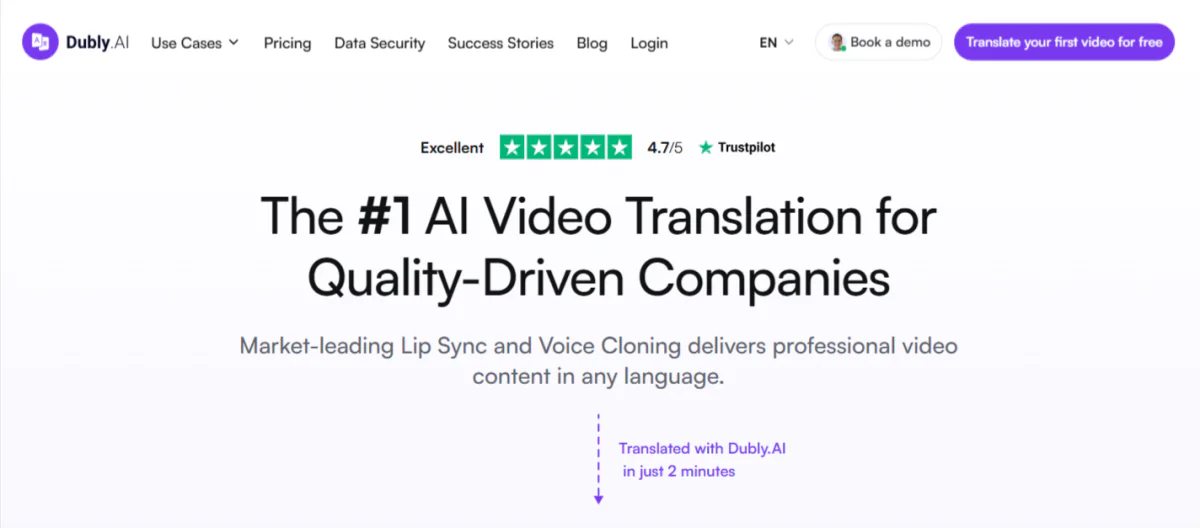
is an
AI video translation and dubbing platform
that turns videos into over 32 languages while keeping the speaker’s voice and lip sync natural. It’s aimed at creators, businesses, and educators who want to localize video content quickly and at scale.
After all, traditional video localization is expensive. It involves hiring voice actors, booking studio time, and going back and forth with a production team for weeks.
Dubly
cuts all of that out.
Lip Sync Technology & Voice Cloning
What makes it stand out is the lip sync technology. They don’t just slap a dubbed audio track over your video and call it a day.
Dubly
actually syncs the translated audio to the speaker’s lip movements, which makes the final product feel more natural and polished.
Combined with voice cloning (where the platform replicates the original speaker’s voice in the target language), it starts to feel less like a translation and more like the speaker actually recorded the video in that language.
Results Delivered in Minutes
The speed is another thing. Results are delivered within minutes instead of days.
For anyone who’s ever waited two weeks for a localized video to come back from a production house, you know how big a deal that actually is.
Used by 750+ Brands
Dubly
is not some new startup nobody’s heard of. Over 750 brands are using it, including some pretty heavy hitters like BMW, Havas, Axel Springer SE, and Hilti. That kind of adoption tells you something about Dubly’s reliability and results.
User Satisfaction
Plus, it holds a
4.3 out of 5 rating on Trustpilot
. I always check third-party reviews before recommending anything, because company websites can say whatever they want. A 4.3 there means people are genuinely happy with it overall.
Bottom line: If you’re creating video content and not localizing it yet, you’re leaving a massive chunk of your potential audience on the table.
is one of the more accessible ways to fix that quickly and effortlessly.
Who is Best For?
is best for anyone who treats localization as a professional workflow, not just a one‑off social‑clip convenience:
YouTubers, course creators, and indie filmmakers who want to localize one video into 32+ languages without reshooting. They can keep their own voice and visual identity (via voice cloning and lip sync) while reaching global audiences.
SMBs, mid‑sized companies, and enterprises
that localize marketing videos, demos, training, and internal communication.
Agencies managing international clients who need professional dubs with glossaries, batch workflows, and
GDPR‑compliant EU‑hosted data
.
Large media houses and publishers who need realistic, lip‑synced dubs for news, documentaries, or films.
Key Features
focuses on high-quality AI video translation and dubbing that easily scales:
Automatically translates your video into 32+ languages and generates a dubbed audio track.
Clones your original voice so the translated version sounds like you (not a generic AI voice).
Lip Sync 2.0
refines mouth movements frame by frame to align with the new audio, preserving the speaker’s identity while maintaining a natural look.
Supports uploads up to 4K resolution and videos of unlimited length (up to 5 GB per file).
Translate into multiple languages simultaneously for global distribution.
Editable transcripts
and subtitles (e.g., SRT) to tweak wording and timing.
Apply brand‑specific terms, jargon, or tone instructions so translations stay on‑brand.
REST API with authentication, webhooks, and batch support so teams can automate dubs at scale.
Data stored on
EU servers and fully GDPR‑compliant
, suitable for media publishers and large enterprises.
Designed to work with
YouTube’s multi‑language audio features
to help creators boost watch time.
Includes lip‑sync and voice‑cloning features for free (within trial limits), so you can test before committing.
How to Use
Here’s how I used
to dub and lip-sync a short YouTube video in minutes:
Sign Up for
Create a Dub
Paste a YouTube Link
Add Dub Details
Add Custom Translation Styles
Create the Dub
View the Download Options
Edit the Translation
Generate the Lip Sync
Start the Lip Sync
Download the Lip Sync Video
Step 1: Sign Up for
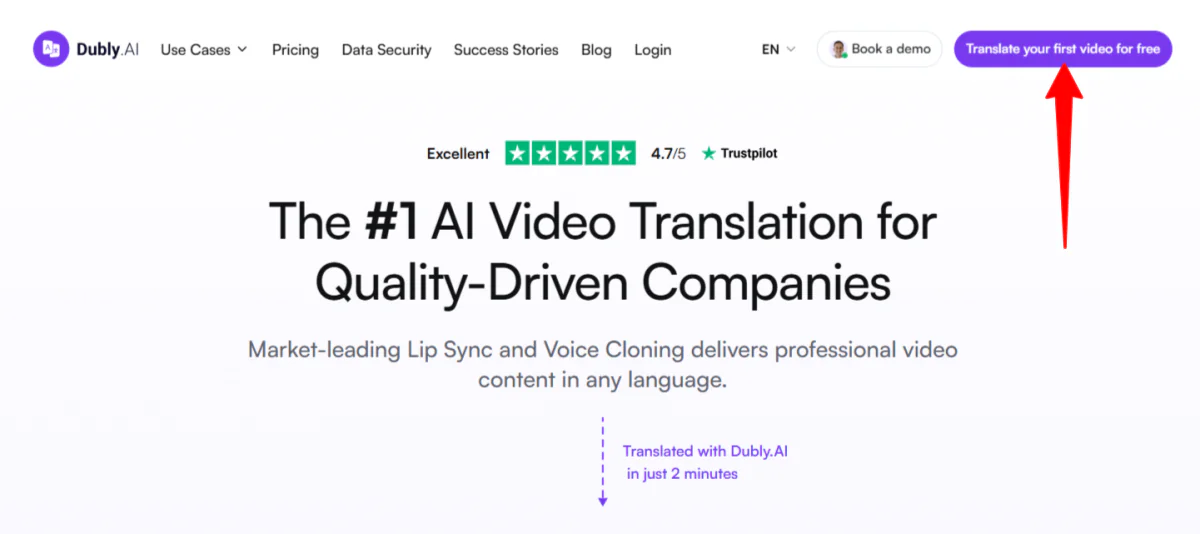
I started by going to
and clicking “Translate your first video for free” in the top right corner.
Step 2: Create a Dub
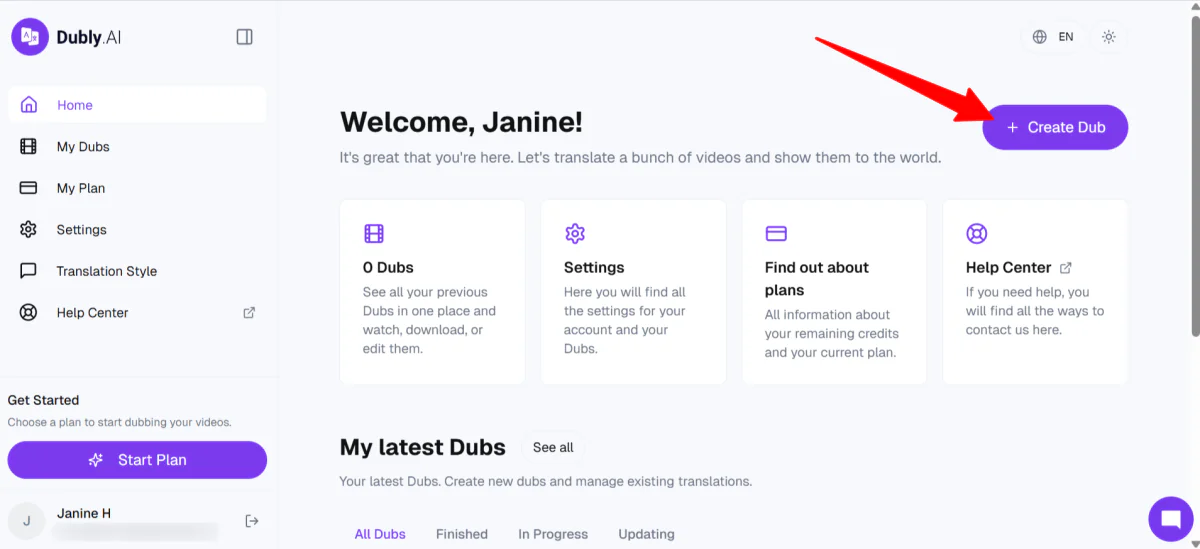
After creating an account, I was taken to my homepage. From there, I selected “Create Dub” on the top right.
Step 3: Paste a YouTube Link
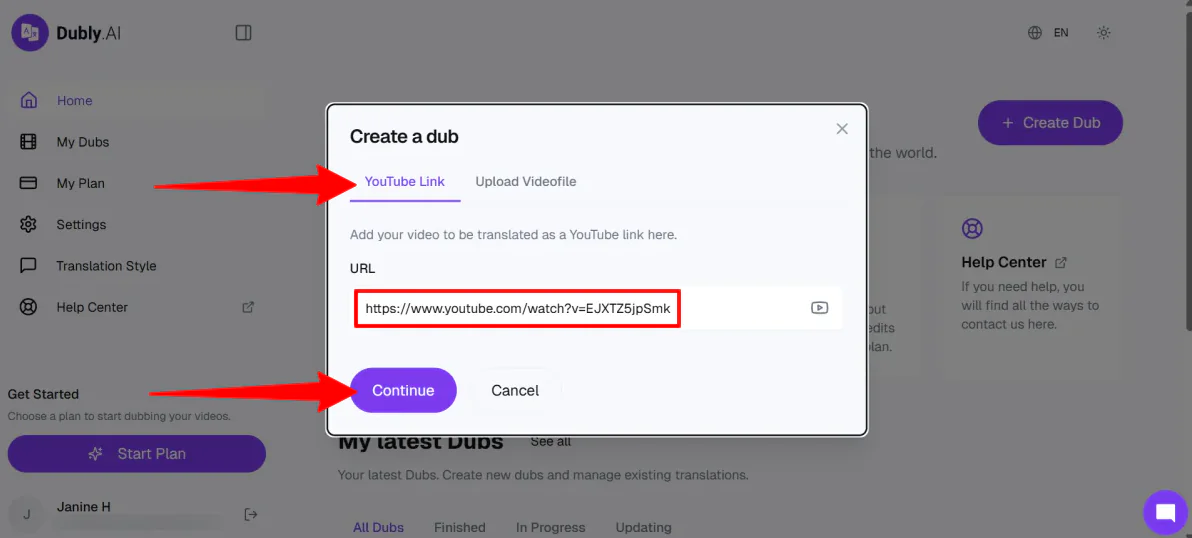
Dubly
gave me two simple ways to create a dub: YouTube Link or Upload a Video File (mp4, mov, maximum 5 GB). I chose to paste a YouTube link, but not just any YouTube video link.
I wanted to paste a YouTube video link that would highlight
Dubly’s
strengths:
voice cloning
, lip-syncing, and emotional tone. I also had to make sure the video had a clear narrator.
I decided to go with an “educational explainer” video by NASA on “What is a Black Hole?”:
Once I pasted my link, I selected “Continue.”
Step 4: Add Dub Details
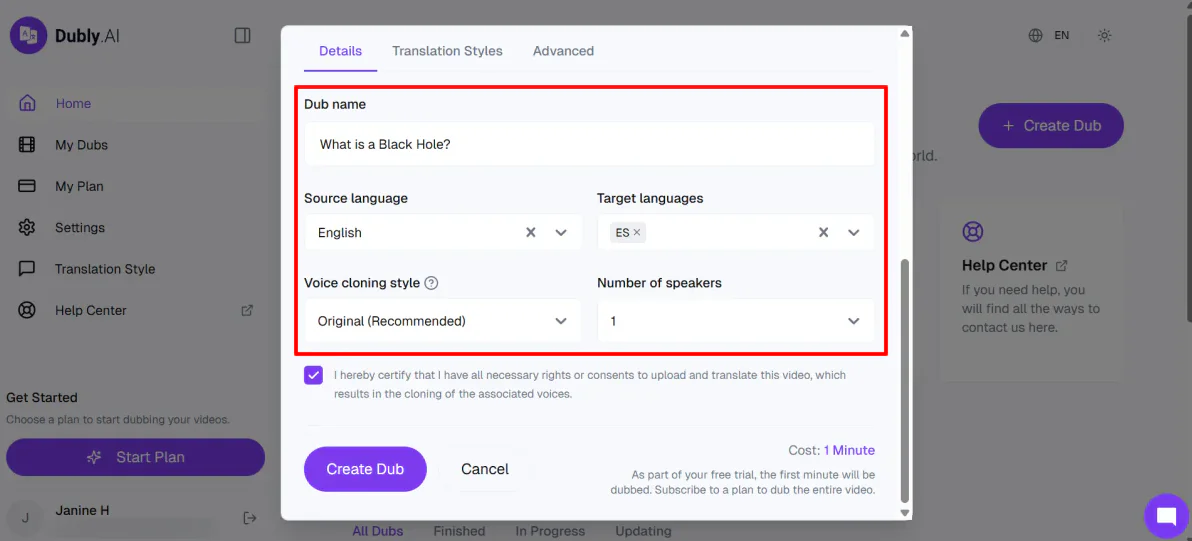
After the video was uploaded, I filled out the details:
Dub name
Source language
Target languages
Voice cloning style
Number of speakers
I decided to translate the source language (English) into Spanish to really test Dubly’s lip-sync technology.
What makes
Dubly
stand out is its ability to dub a video into multiple languages simultaneously, saving time and streamlining the entire process. This means you can reach a global audience much faster without needing separate edits for each language.
Step 5: Add Custom Translation Styles
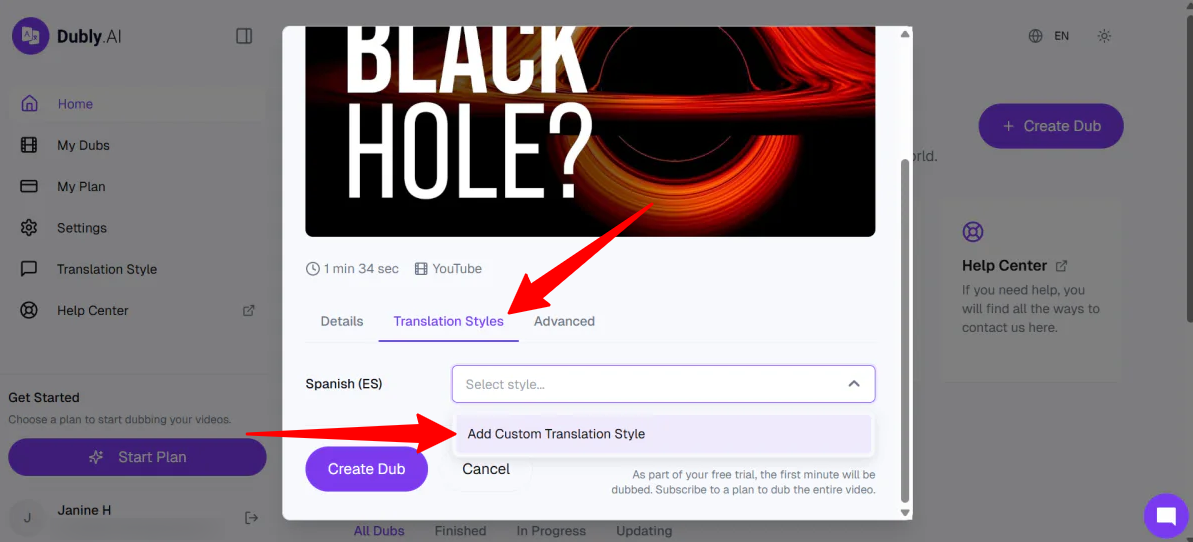
It’s also worth mentioning that in the “Translation Styles” tab, you can add custom translation styles.
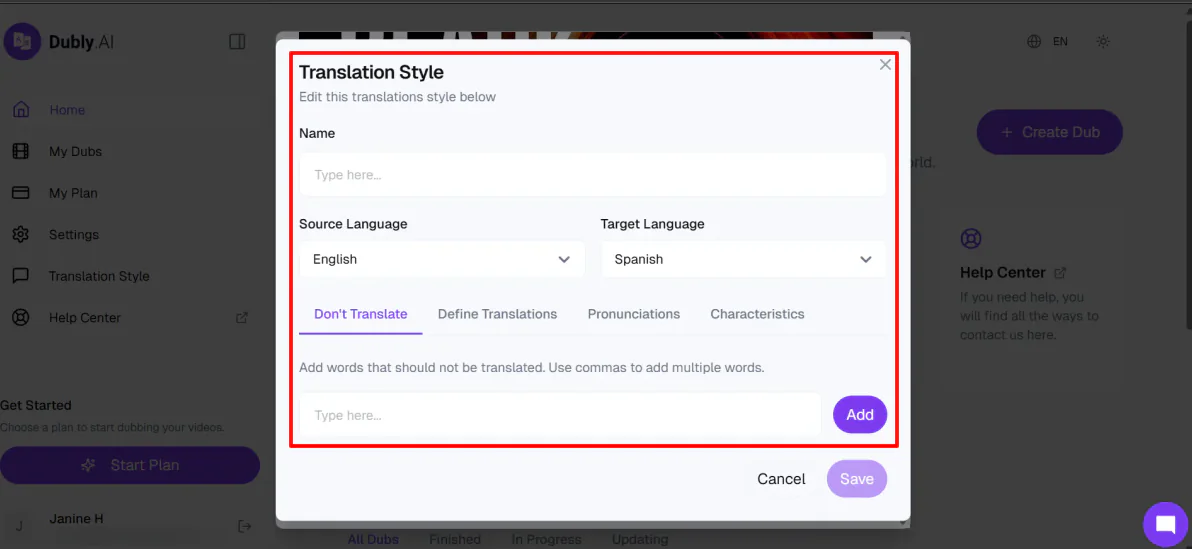
You can give the translation style a name, specify words to avoid translating, how specific words or phrases should be translated and pronounced, and set the writing style, tone, and formality. This helps ensure your translations stay consistent and aligned with your brand or intended voice across different languages.
Step 6: Create the Dub
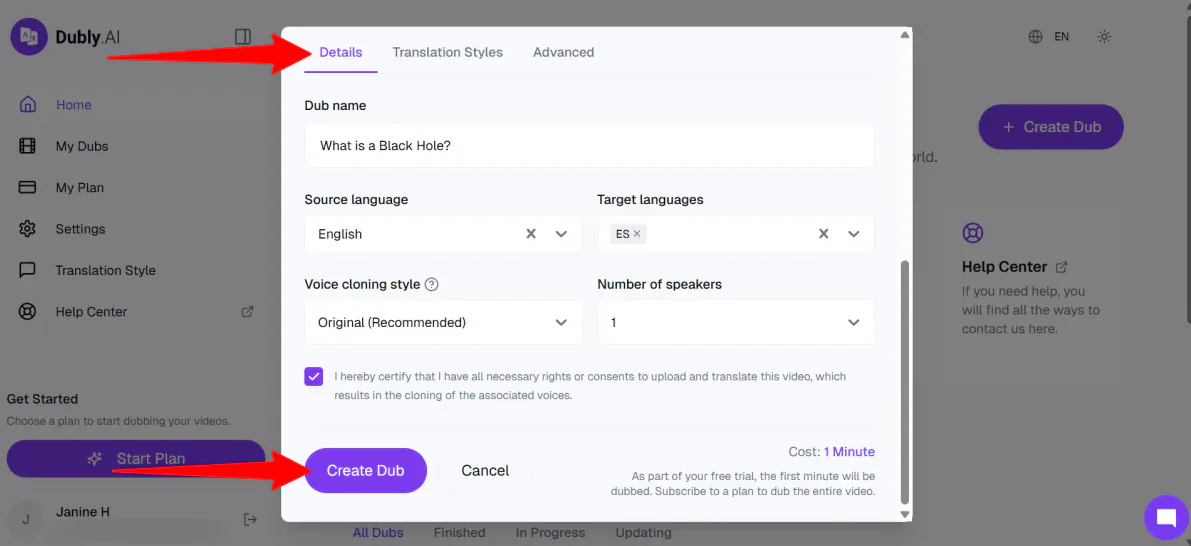
I left “Translation Style” alone, and back in the “Details” tab, I hit “Create Dub.”
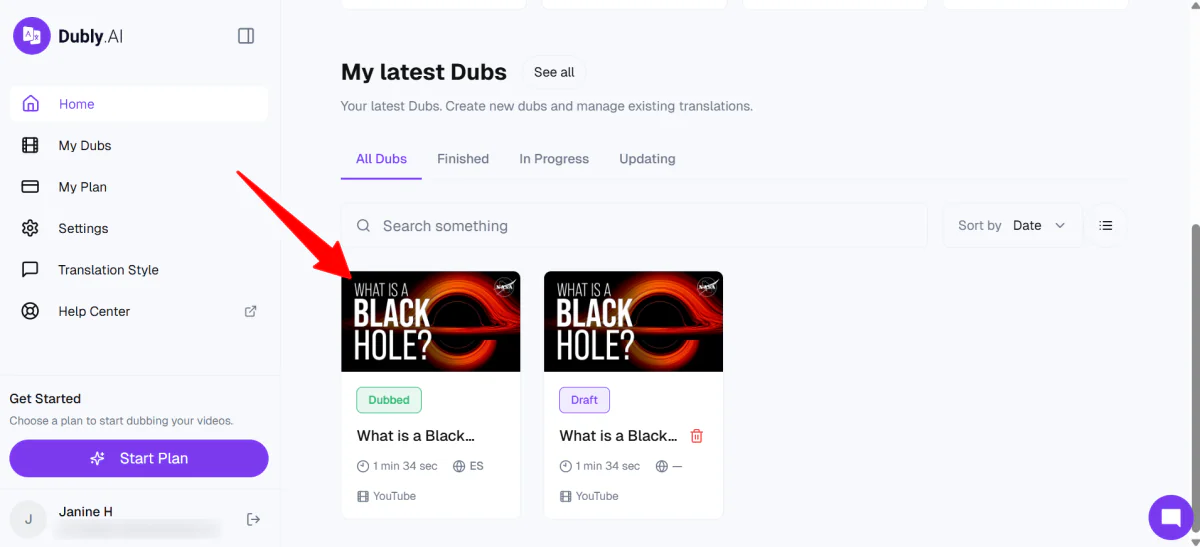
Immediately,
Dubly
got to work. A few minutes later, my dub was ready and accessible on my homepage.
Step 7: View the Download Options
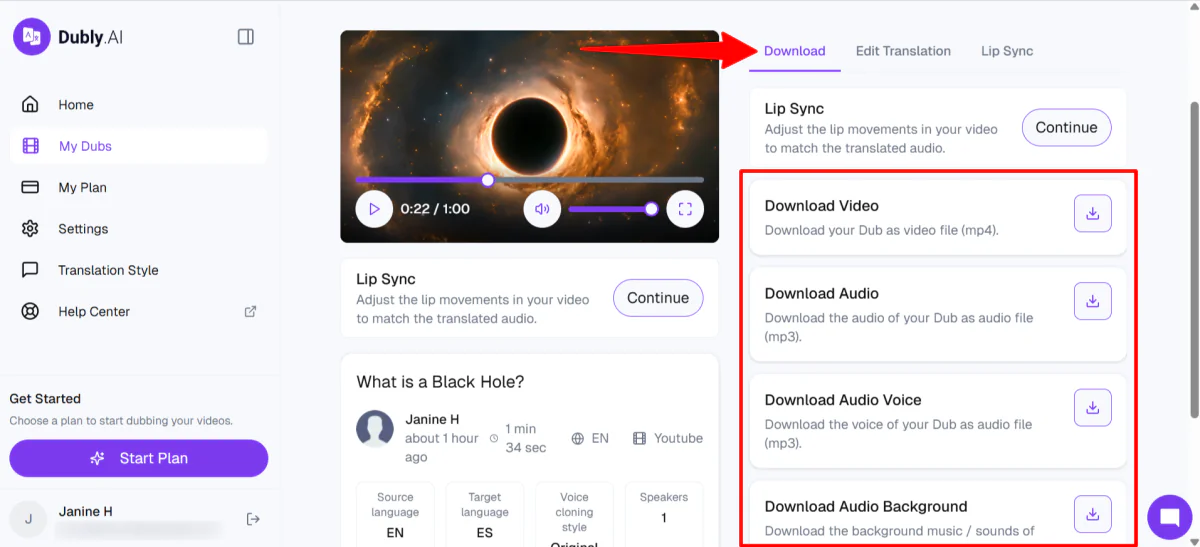
When I played the preview, the dubbed voice sounded exactly like the woman’s voice in the original and spoke perfect Spanish. The only problem was that the lips weren’t syncing, but that was the next step.
On the right, under “Download,” were options to download the video, audio, audio voice, audio background, and SRT.
Step 8: Edit the Translation
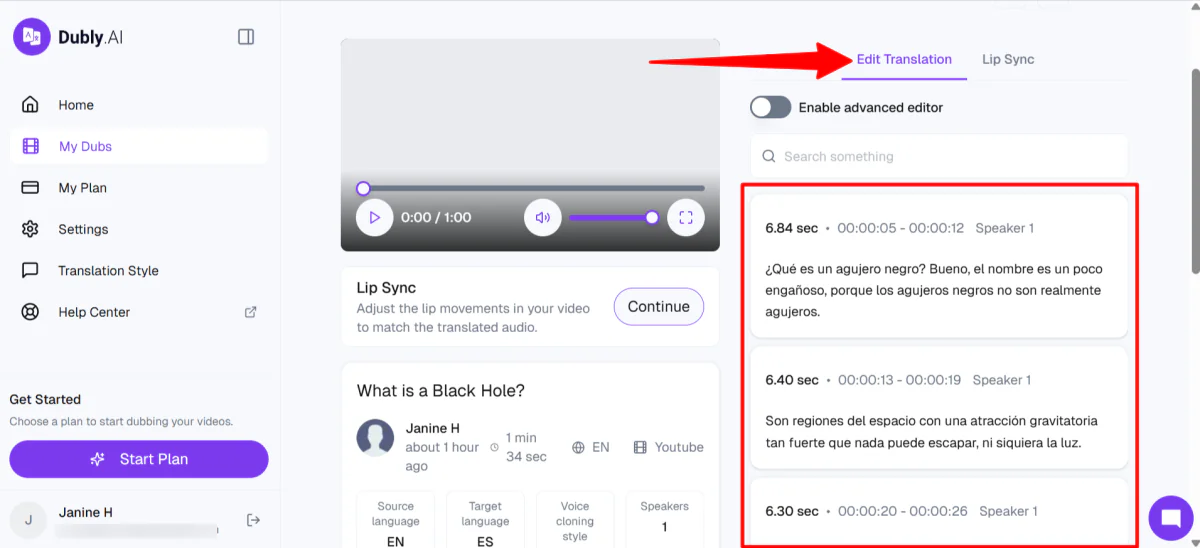
In the “Edit Translation” tab, I could directly edit parts of the video.
Step 9: Generate the Lip Sync
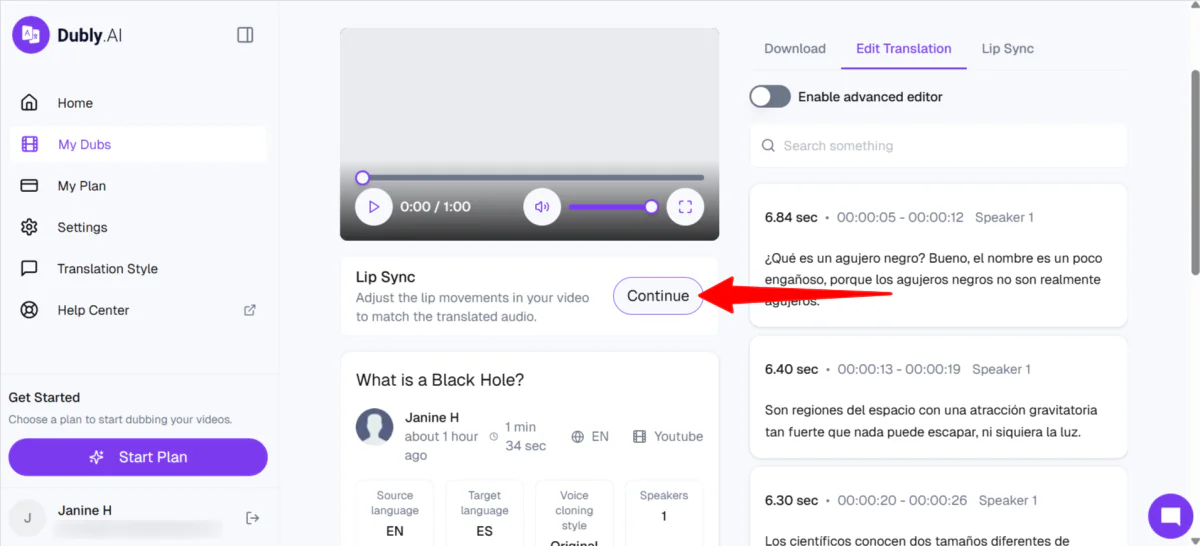
I clicked “Continue” to apply lip sync to my video.
Step 10: Start the Lip Sync
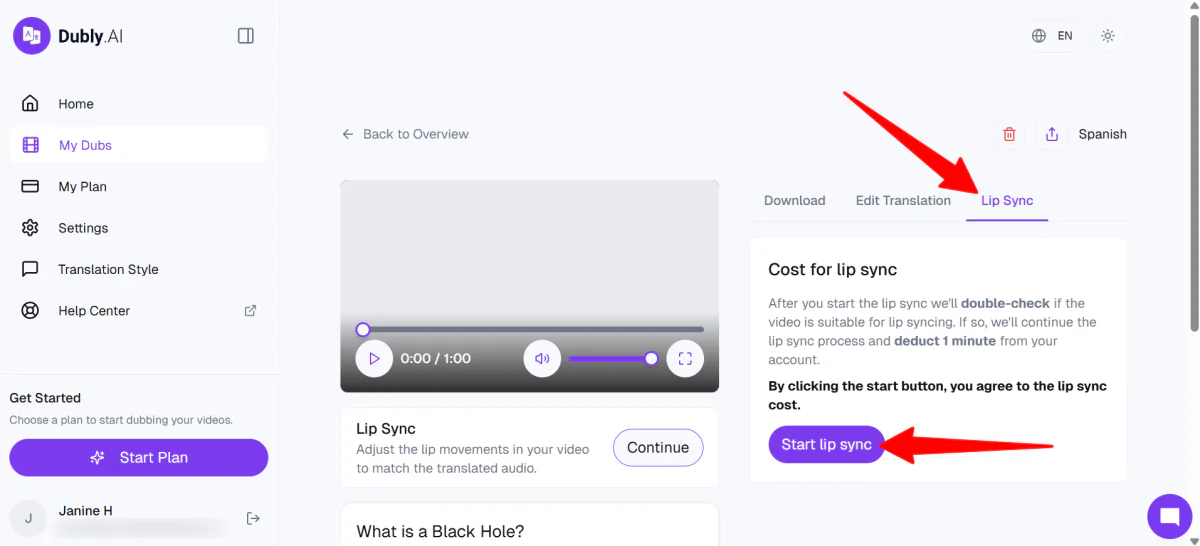
In the “Lip Sync” tab, I clicked “Start lip sync.”
Dubly
deducts one minute from your account to apply the lip sync.
Step 11: Download the Lip Sync Video
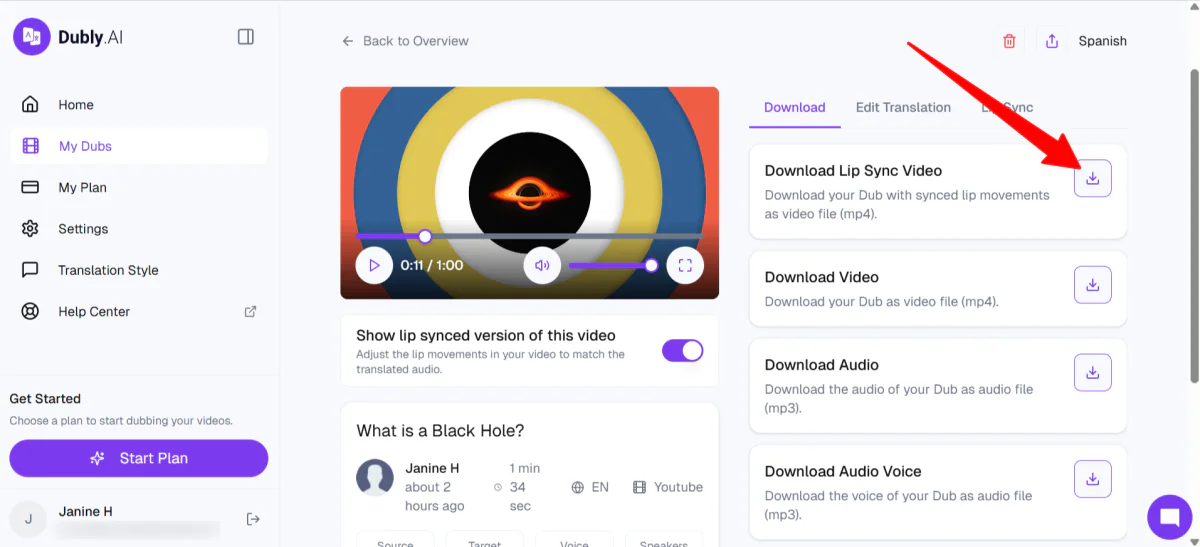
Lip syncing in
Dubly
can take up to 24 hours, but usually it’s much faster.
Mine only took a few minutes since it was a one-minute video. Once complete, I could download the dubbed version with lip sync from the “Download” tab. Otherwise, I could preview it on the left side.
Here’s how it came out:
I was genuinely impressed. The woman’s voice in Spanish retained the same tone and character as the original English, which made the dubbing feel seamless. While there were a few minor timing mismatches, the result still came across as natural and convincing overall.
Overall,
made the entire dubbing and lip-sync process feel fast and straightforward. It effortlessly turned a simple YouTube link into a fully translated video in just a few steps.
The results were surprisingly natural, especially in voice consistency and translation quality, even before fine-tuning the lip sync.
Top 3 Alternatives
Here are the best
alternatives I’ve tried:
Vozo
The first
alternative I’d recommend is Vozo. It’s an AI video localization platform that covers translation, dubbing, lip sync, subtitle translation, and even
visual text translation for graphics
. I tried it using the same method as Dubly: running a YouTube video through the workflow.
Getting started was simple. I signed up for the free trial, pasted my YouTube link, and set the target language to Spanish. A few minutes later, the dubbed video was ready with subtitles:
One thing to keep in mind about Vozo: the lip sync took about an hour to generate for this seven-minute video. Annoying if you’re in a rush, but understandable since the video is seven times longer than the
video I generated for free with Dubly
. Plus, the lip-sync looked genuinely realistic, so it’s hard to complain too much.
I also tested the Long Video to Shorts tool, which pulled nine clips from my original video, each with a virality score and transcript. This built-in tool is great for repurposing content fast.
Compared to, Vozo goes wider: 110+ languages, visual translation, and additional tools like
Long to Shorts
to broaden your reach even further. Meanwhile,
stays more focused on high‑quality dubbing with strong editing, glossary, and enterprise‑compliance features.
For a broader creative AI suite with advanced localization, choose Vozo. For a streamlined dubbing workflow built for business teams, stick with.
Read my
Vozo AI review
or visit
Vozo
!
HeyGen
The next
alternative I’d recommend is HeyGen. It uses AI to create videos from
text prompts
, scripts, and images with realistic avatars, voice cloning, and multilingual dubbing.
I tested the prompt-to-video feature by describing a high-energy travel creator at a Tokyo street market with moody lighting, neon reflections, and dynamic hand gestures. HeyGen built a full video plan with scenes, voiceovers, and visuals before generating anything, which was a nice touch.
The final video looked solid. It had good lip sync, a realistic avatar, and scenes that actually flowed together.
I also cloned myself into an avatar, which was genuinely impressive and a little weird:
It was a pretty simple process: I uploaded footage, verified my identity, and HeyGen generated a video of me saying things I never recorded. The voice, appearance, and mannerisms all sounded and looked remarkably like me.
Compared to, HeyGen is more for creating videos from scratch with AI avatars and the ability to clone yourself. On the other hand, is more focused on translating and dubbing existing real footage with stronger localization controls.
For AI avatar videos, choose HeyGen. For translating and dubbing real content into multiple languages, choose.
Read my
HeyGen review
or visit
HeyGen
!
Vidnoz
The final
alternative I’d recommend is Vidnoz. It’s an all-in-one AI video platform with realistic avatars, voice cloning, video translation, and over 2,800 templates across industries like education, business, and social media. You can start from a text prompt, URL, PDF, script, or product link.
I used the AI Video Wizard with this prompt: “A 1-minute trend report on how AI avatars are replacing traditional corporate training in 2026.” A few minutes later, the video was ready:
The avatar looked professional, the lip sync was solid, and the video held together as a whole. The downside was that it felt a little rushed, and some of the stock images were off.
I swapped one of the images out using the built-in
AI image generator
, and it looked noticeably better. The editing workflow is intuitive enough that small fixes don’t feel like a chore.
Compared to, Vidnoz is built for generating videos from scratch using avatars and templates. Meanwhile, Dubly is focused on dubbing and localizing existing real footage with stronger voice preservation and translation controls.
For multilingual dubbing and video localization, choose. For AI avatar videos and fast all-in-one video creation, choose Vidnoz.
Read my
Vidnoz review
or visit
Vidnoz
!
Review: The Right Tool For You?
Using
felt smooth from start to finish. I liked how quickly I could take a simple YouTube video and turn it into a fully dubbed, translated version with realistic voice cloning and natural tone preservation.
While it’s good at what it does, it might not be the best for quick subtitles or casual edits. If that’s something you’re looking for, you might want to consider these alternatives:
Vozo
is best for those who want a broader AI localization suite with extra tools, like visual translation and short-form clip generation alongside dubbing.
HeyGen
is best for those who want to create AI avatar videos from scratch, including talking presenters and full scripted scenes.
Vidnoz
is best for those who want an all-in-one AI video generator with templates, avatars, and fast content creation without needing existing footage.
But if you care about keeping your original voice in your videos, expanding into multiple languages, and producing content that still feels authentic,
Dubly
is a great choice.
Thanks for reading my review! I hope you found it helpful.
Sign up for Dubly
and create your first AI-dubbed and translated video for free.


